Bank Reconciliation
Bank reconciliation is the process of matching imported bank transactions with your invoices, payments, and expenses in Lumabill. This ensures your bookkeeping records align precisely with your actual bank movements -- and helps you keep track of outstanding items.
Requirement: This feature requires the Bookkeeping module (PRO plan). Transactions must first be uploaded via the CAMT Import.
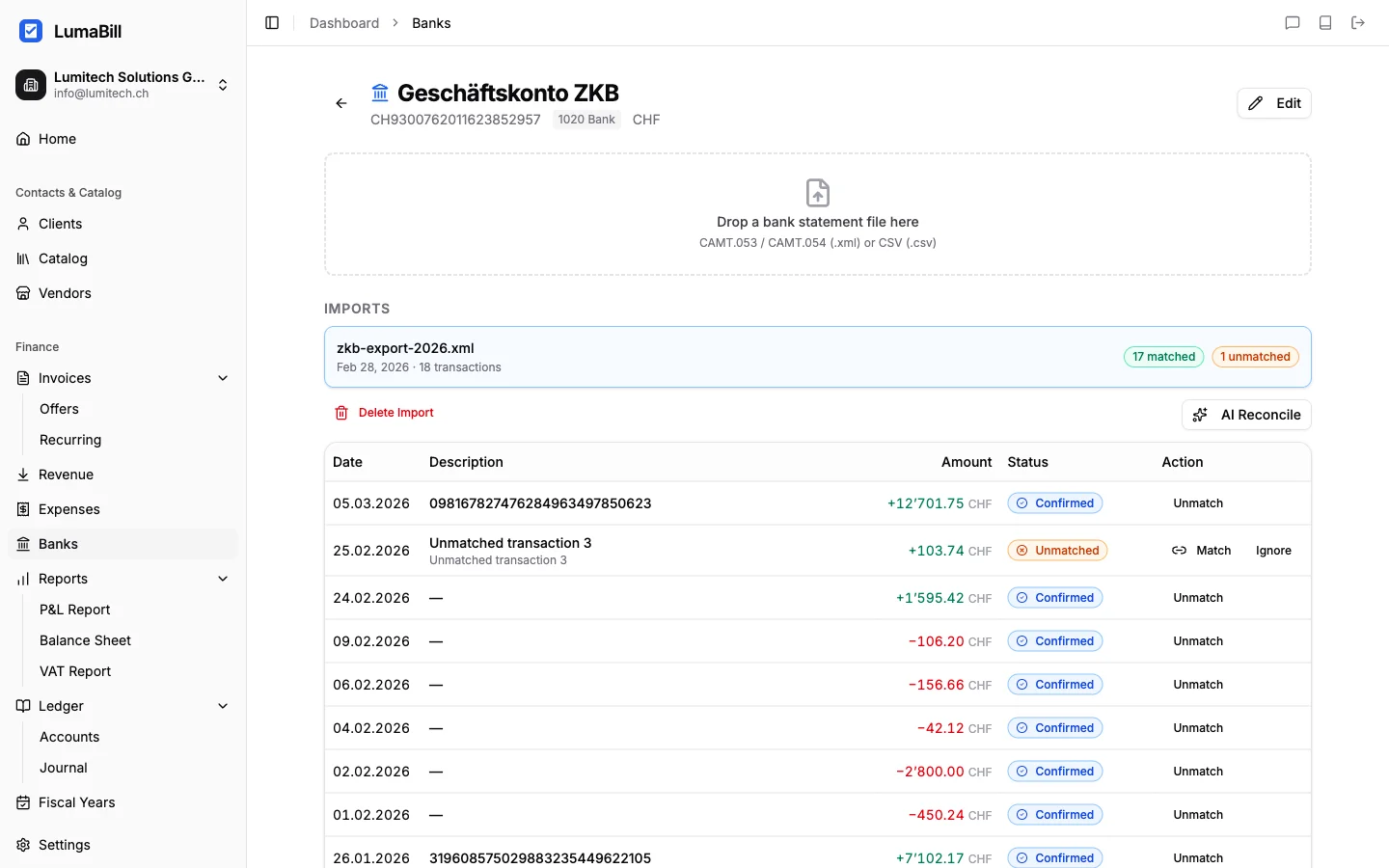
How Bank Reconciliation Works
Bank reconciliation connects two worlds: the actual money movements in your bank account (imported via CAMT) and the accounting records in Lumabill (invoices, expenses, manual journal entries). Each bank transaction is matched to a corresponding entry.
Automatic Matching
Lumabill first attempts to match transactions automatically. Matching is based on:
- QR reference number -- The most reliable method. When a customer pays via QR invoice, the bank transaction contains the reference number, which Lumabill can directly link to the correct invoice.
- Amount and time window -- If the amount of a transaction matches an open invoice exactly and the date falls within the expected timeframe, Lumabill suggests a match.
Automatically detected matches are displayed as suggestions. You can confirm or reject them with a single click.
Manual Matching
Not all transactions can be matched automatically -- for example, partial payments, cash payments, or transfers without a reference number. In these cases, you assign the transaction manually:
- Click on an unmatched transaction
- Select the matching invoice or expense from the list of open items
- Confirm the assignment
Tip: One invoice can be split across several payments (partial payment): a bank credit below the open amount is booked as a partial payment and the invoice stays open with the remaining balance.
Journal Entry Creation
When you reconcile a transaction, Lumabill automatically creates the corresponding journal entries in your ledger:
- Incoming payment (credit): Debit to bank account, credit to accounts receivable
- Outgoing payment (debit): Debit to accounts payable, credit to bank account
In simple bookkeeping mode, a payment receipt or payment is recorded directly instead.
Status and Progress
The overview page shows you the current reconciliation status:
- Matched -- Transaction is assigned to an invoice or expense
- Suggested -- Lumabill has found a likely match
- Open -- No match found, manual action required
- Ignored -- Intentionally skipped (e.g., internal transfers)
Checking the Bank Balance
At the end of the reconciliation process, the calculated bank balance in Lumabill should match the actual balance shown by your bank. A discrepancy indicates missing bookings or unimported transactions.
Best Practices
- Reconcile regularly -- Perform bank reconciliation at least weekly to catch discrepancies early.
- Use QR invoices -- QR reference numbers enable the most reliable automatic matching.
- Resolve open items -- Transactions that remain open for an extended period should be investigated promptly.
- Before year-end closing -- Ensure all transactions for the period are reconciled before closing the fiscal year.
What's Next?
With your bank movements reconciled, your books are up to date. Use the Profit & Loss report or the Balance Sheet to get a clear financial overview.