Choose Bookkeeping Mode
In the second step of the setup wizard, you decide how to manage your finances. Lumabill offers two bookkeeping modes: simple income/expense tracking and full double-entry bookkeeping. You will also configure your base currency and VAT settings here.
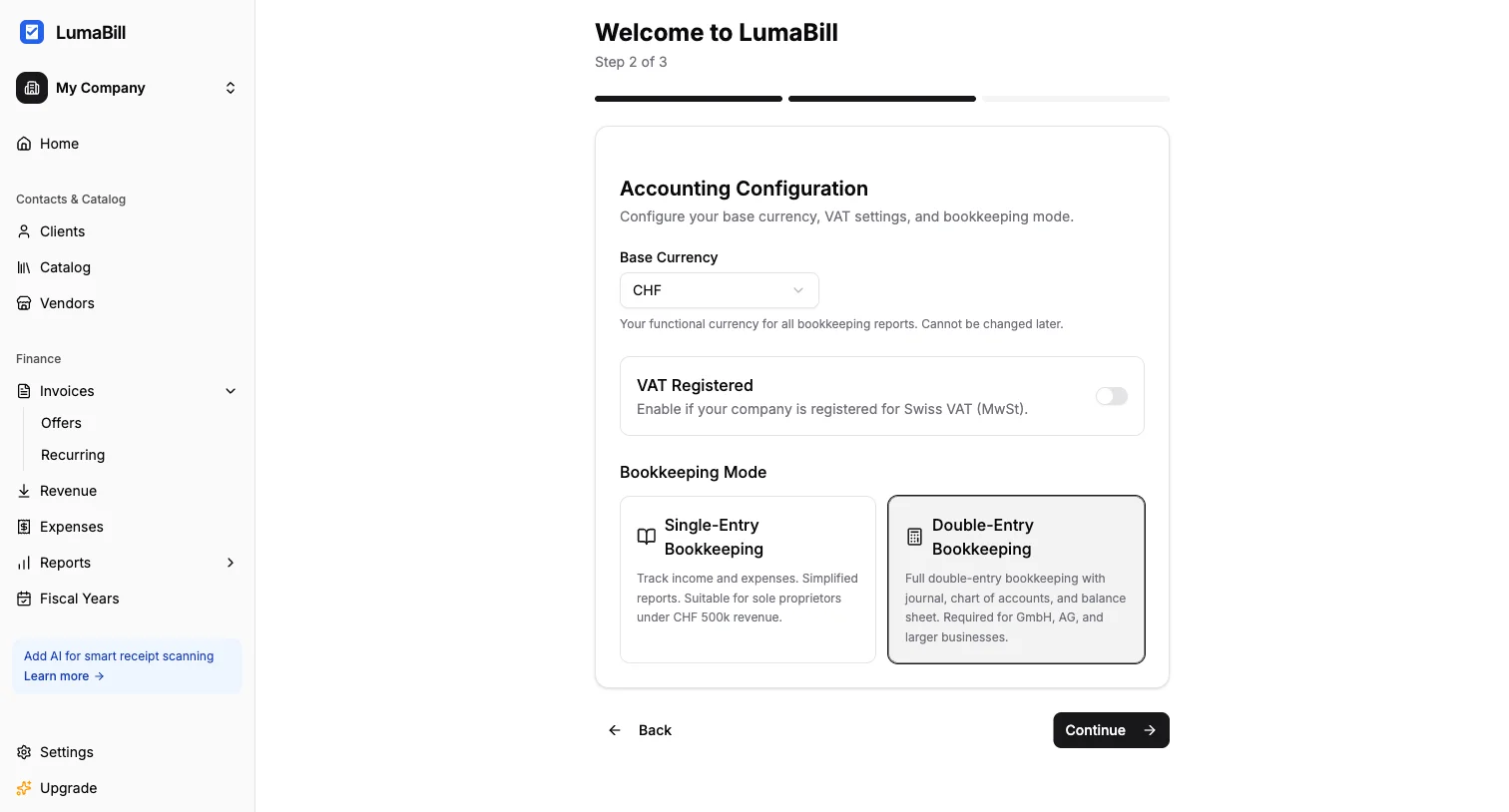
Set Your Base Currency
Choose your company's primary currency from the available options: CHF, EUR, USD, or GBP.
The base currency determines:
- The default currency for new invoices
- The currency used in your accounting reports
- The reference currency for exchange rate conversions
Important: The base currency can be changed after setup, but it is recommended to set it correctly from the start. You can still create invoices in other currencies at any time.
Configure VAT
Toggle the VAT Registered switch if your company is registered for VAT. In Switzerland, this is mandatory once your annual revenue exceeds CHF 100,000.
When you enable VAT, an additional field appears for selecting your default VAT rate:
- 8.1% -- Standard rate (most goods and services)
- 2.6% -- Reduced rate (food, books, newspapers, etc.)
- 3.8% -- Special rate (accommodation)
Tip: The rate you choose here is used as the default for new invoice line items. You can adjust the rate per line item at any time.
Simple Bookkeeping
Simple bookkeeping is ideal for:
- Sole proprietors and freelancers
- Businesses with a modest transaction volume
- Anyone who prefers a straightforward approach
In this mode, you simply record income and expenses. Lumabill automatically calculates your profit. No knowledge of charts of accounts or journal entries is required.
Simple bookkeeping includes:
- Income and expense tracking
- Automatic profit calculation
- Clear financial overviews
- Receipt management with scan support (Pro)
Double-Entry Bookkeeping
Double-entry bookkeeping is designed for:
- Corporations (GmbH/LLC, AG/Ltd) that are legally required to use it
- Businesses that need a full balance sheet
- Companies with more complex transactions
In this mode, you work with a chart of accounts (the Swiss SME chart of accounts is created automatically). Every entry has a debit and a credit account. Lumabill generates a balance sheet, income statement, and other reports from your entries.
Double-entry bookkeeping includes:
- Complete chart of accounts based on the Swiss standard
- Journal with debit/credit entries
- Balance sheet and income statement
- Fiscal year management with year-end closing
- VAT report (Pro)
Which Mode Is Right for You?
| Criterion | Simple | Double-Entry |
|---|---|---|
| Legal form | Sole proprietorship | LLC, Ltd |
| Revenue | Under CHF 500,000 | Over CHF 500,000 |
| Accounting knowledge | None required | Basic knowledge recommended |
| Reports | Profit overview | Balance sheet + income statement |
Tip: If you are unsure, start with simple bookkeeping. You can switch to double-entry bookkeeping later at any time.
Confirm Your Settings
Click Next to save your accounting settings. In the final step, you choose whether to start fresh or import existing data from Bexio.
What's Next?
You are now ready to create your first invoice -- in just a few clicks, complete with a Swiss QR payment slip.