Profit & Loss
The Profit & Loss report (also known as the income statement) shows you how much your business earned and spent over a given time period. The result is your profit or loss -- one of the most important metrics for any business.
Requirement: This feature requires the Bookkeeping module (PRO plan).
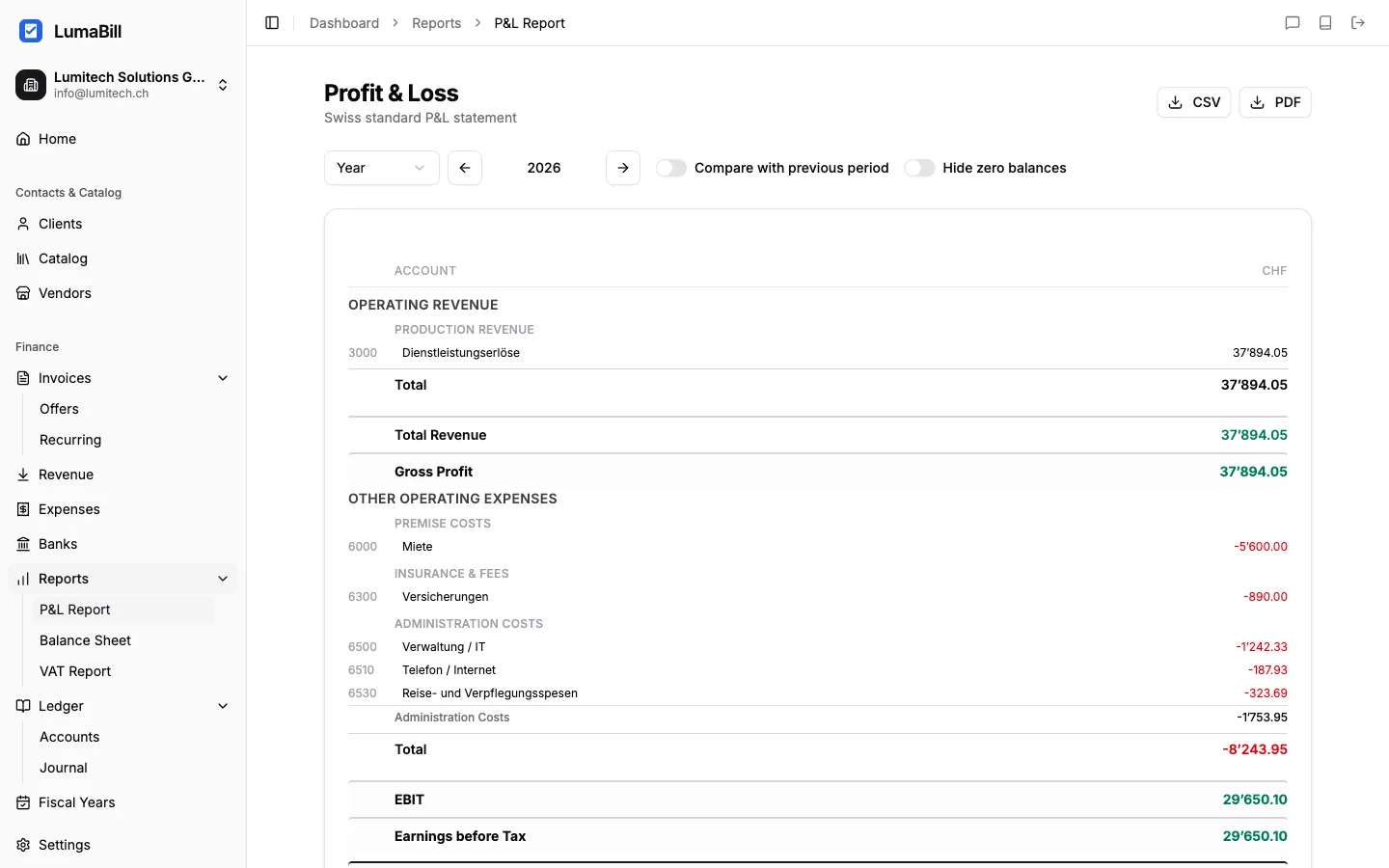
Structure of the Report
The Profit & Loss report is divided into two main sections:
Revenue (Income)
All income of your business is listed here, grouped by account:
- Sales revenue -- Income from invoices and sales
- Other income -- Interest income, rental income, miscellaneous
- Extraordinary income -- One-time, non-recurring revenue
Expenses
All expenses appear here, also grouped by account:
- Cost of goods -- Purchases of goods and raw materials
- Personnel costs -- Salaries, social insurance, allowances
- Premises costs -- Rent, utilities, maintenance
- Administrative costs -- Office supplies, insurance, IT
- Depreciation -- Write-downs on fixed assets
- Financial expenses -- Bank fees, interest
Result
At the bottom, the report shows the result:
Revenue - Expenses = Profit (or Loss)
Generating the Report
- Navigate to Bookkeeping > Reports > Profit & Loss
- Select the time period (e.g., current quarter, last fiscal year, custom)
- Click Generate report
Filter Options
- Date range -- Choose any start and end date
- Fiscal year -- Quick selection of a defined fiscal year
- Quarter / Month -- Predefined periods for fast access
Tip: Compare different time periods to spot trends -- for example, Q1 this year vs. Q1 last year.
Detail View
Each line item in the report shows the total amount for a given account. Click on an account to see the individual postings that contributed to that amount.
The detail view shows:
- Posting date
- Description and reference
- Amount (debit / credit)
- Linked invoice or expense
Export
You can export the Profit & Loss report in different formats:
- PDF -- For filing and printing
- CSV -- For further processing in Excel or other tools
Click Export and select the desired format.
Tips for Interpretation
- Gross profit = Sales revenue minus cost of goods. Shows the profitability of your core business.
- Operating result = Gross profit minus operating costs. Shows whether day-to-day operations are profitable.
- Net profit = The final result after all income and expenses.
- A negative number (loss) is not unusual during the startup phase, but should be monitored closely.
What's Next?
Complement your income statement with the Balance Sheet for a complete picture of your financial position. If you are registered for VAT, also generate the VAT Report.